Building an Autonomous Multi-Agent ERP Swarm on Azure AI Foundry: Field Notes on Two-Phase Commit and SAP OData
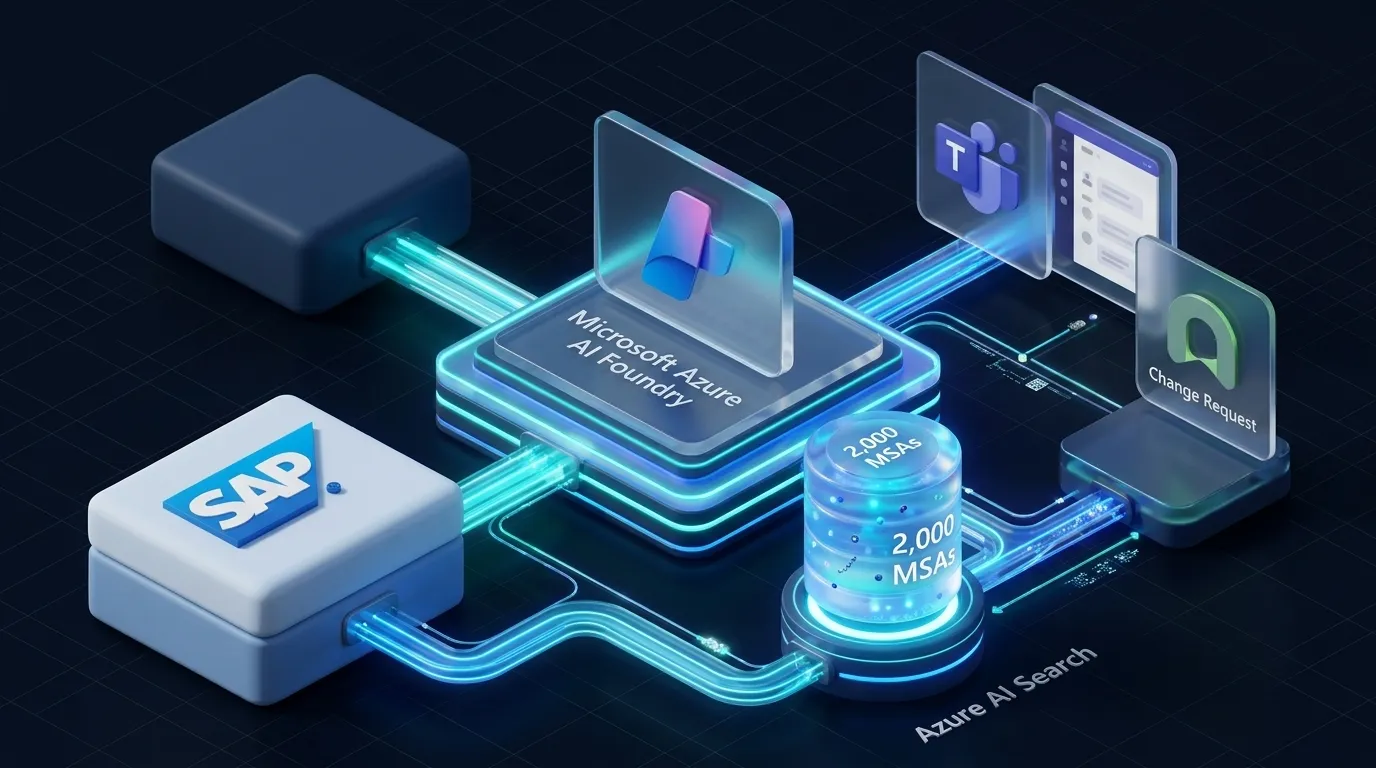
Most AI agent demos operate in low-stakes environments: summarize a document, draft a message, or mock a toy API call. When attempting to deploy autonomous agent architectures into mission-critical enterprise backbones such as SAP S/4HANA ERP, standard single-turn LLM patterns fail immediately.
In a production supply chain, granting an autonomous agent direct write access to financial or inventory ledgers is an unacceptable risk. A single hallucinated vendor ID or miscalculated purchase quantity can trigger unauthorized multi-thousand-dollar transactions and violate SOX compliance boundaries.
These field notes detail the design and implementation of an Autonomous Multi-Agent Swarm built on Microsoft Azure AI Foundry (Agent Service). The architecture decouples LLM reasoning from transactional state mutation by enforcing a Cryptographic Two-Phase Commit (2PC) Approval Gate through Microsoft Teams and ServiceNow.
Swarm Topology and System Architecture
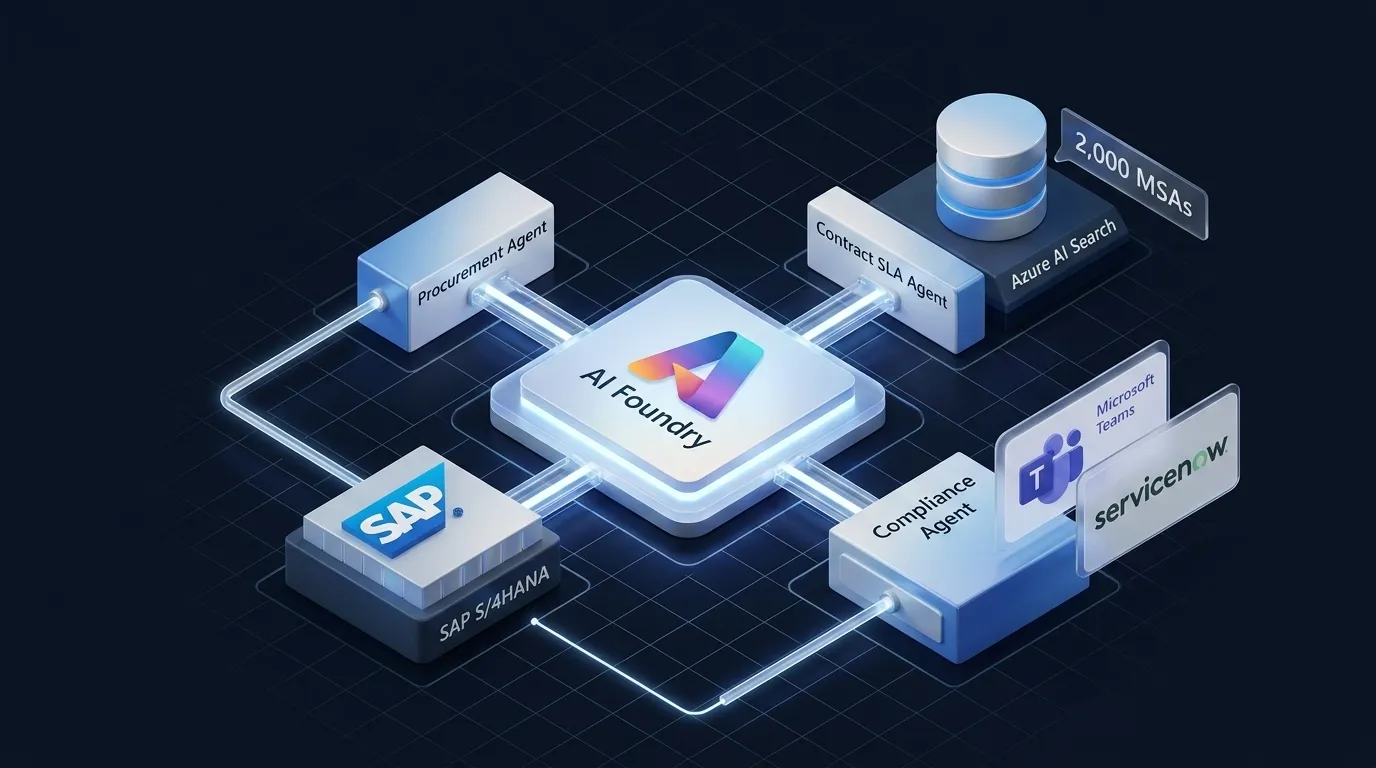
The swarm divides operational responsibilities across three isolated agents coordinated by the Azure AI Agent Service orchestrator:
Specialized Swarm Agents
- Procurement Agent: Queries real-time inventory balances from SAP S/4HANA via OData services and stages pending purchase orders in an isolated draft state.
- Contract SLA Agent: Performs hybrid vector and semantic search across 2,000 vendor Master Service Agreements (MSAs) in Azure AI Search to verify delivery guarantees and penalty terms.
- Compliance and Approval Agent: Evaluates procurement risk thresholds, generates a cryptographically signed Microsoft Teams Adaptive Card for human sign-off, and records an official ServiceNow Change Request (CHG0010294).
The Cryptographic Two-Phase Commit Protocol
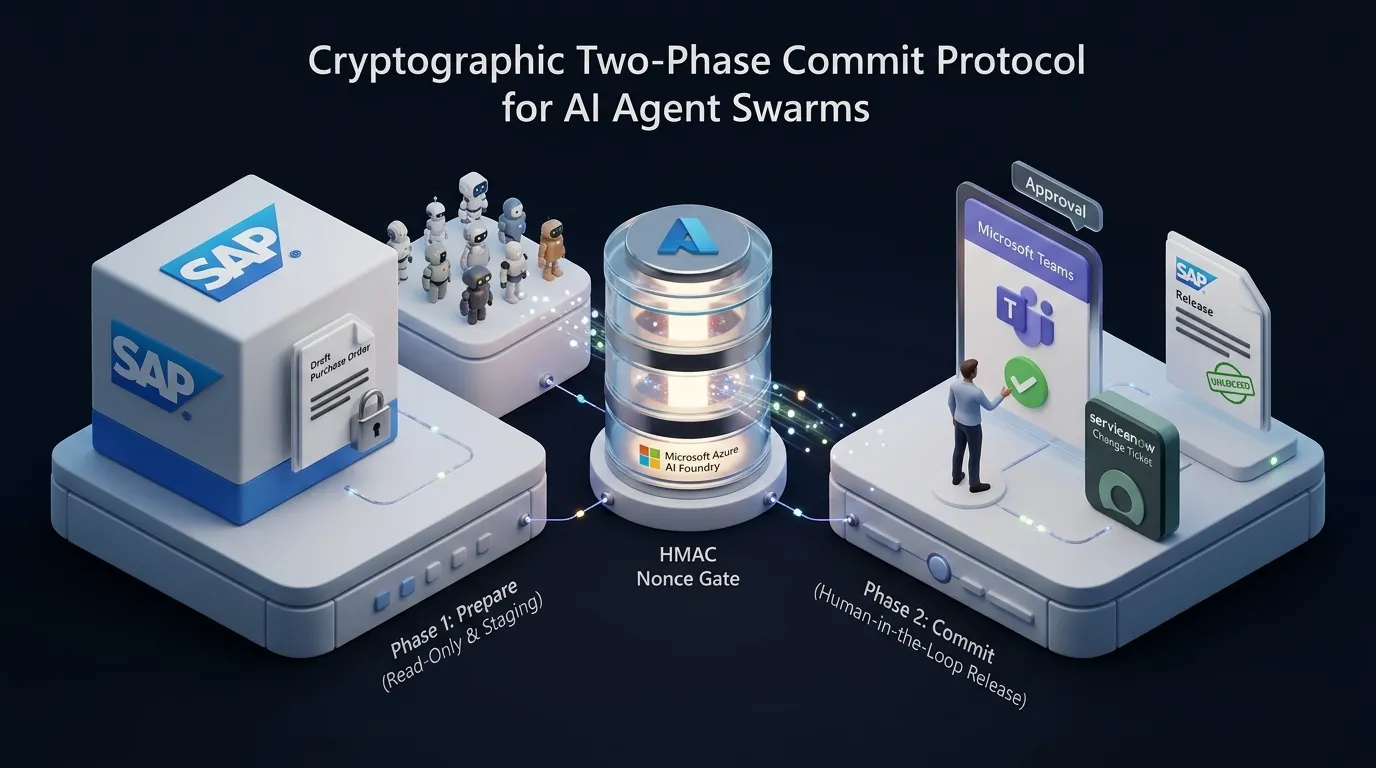
To guarantee that no autonomous agent directly executes unvalidated financial mutations, the workflow operates as a two-phase state machine:
Phase 1: Prepare (Read-Only and Draft Staging)
In Phase 1, the AI agent possesses zero write authorization on the live financial ledger. The Purchase Order is created in SAP with an explicit lock state (BLOCKED_FOR_APPROVAL). The ERP database rejects automated dispatch until Phase 2 verifies a valid HMAC nonce signed by the Operations Director.
Phase 2: Commit (Human-in-the-Loop Release)
Upon reviewing the risk assessment, the Operations Director approves the purchase directly inside Microsoft Teams. The Compliance Agent verifies the cryptographic signature, registers the ServiceNow Change Ticket, and releases the purchase order in SAP S/4HANA.
Step-by-Step Implementation
1. Passwordless Azure AI Foundry Initialization
Authentication uses Microsoft Entra Managed Identities rather than static connection strings or keys:
import os
from azure.identity import DefaultAzureCredential
from azure.ai.projects import AIProjectClient

# Passwordless Authentication via Entra ID Managed Identity
credential = DefaultAzureCredential()

client = AIProjectClient(
    subscription_id=os.environ["AZURE_SUBSCRIPTION_ID"],
    resource_group_name=os.environ["AZURE_RESOURCE_GROUP"],
    project_name=os.environ["AZURE_AI_PROJECT_NAME"],
    credential=credential,
)
2. Implementing the Two-Phase Commit Gate
The compliance gate signs staged transactions with a non-reusable HMAC nonce:
import hmac
import hashlib
from dataclasses import dataclass

@dataclass
class StagedPurchaseOrder:
    po_id: str
    vendor_id: str
    part_number: str
    quantity: int
    unit_price: float
    total_amount: float
    status: str
    nonce: str

class TwoPhaseCommitGate:
    def __init__(self, signing_secret: bytes):
        self.signing_secret = signing_secret

    def stage_draft_po(self, vendor_id: str, part: str, qty: int, price: float) -> StagedPurchaseOrder:
        total = qty * price
        # Generate non-reusable HMAC nonce for the Teams card payload
        raw_payload = f"{vendor_id}:{part}:{qty}:{total}"
        nonce = hmac.new(self.signing_secret, raw_payload.encode(), hashlib.sha256).hexdigest()

        return StagedPurchaseOrder(
            po_id=f"DRAFT-{hashlib.md5(raw_payload.encode()).hexdigest()[:8]}",
            vendor_id=vendor_id,
            part_number=part,
            quantity=qty,
            unit_price=price,
            total_amount=total,
            status="PREPARED",
            nonce=nonce
        )

    def verify_and_commit(self, staged_po: StagedPurchaseOrder, approval_nonce: str, director_jwt: str) -> dict:
        """Phase 2: Verifies approval signature before firing ERP release."""
        if not hmac.compare_digest(staged_po.nonce, approval_nonce):
            raise PermissionError("Security Violation: Invalid or tampered approval nonce!")

        staged_po.status = "COMMITTED"
        return {
            "action": "SAP_RELEASE_COMMITTED",
            "po_id": staged_po.po_id,
            "total_authorized": staged_po.total_amount,
            "audit_trail": f"Approved by Director token {director_jwt[:12]}..."
        }
3. Grounding Against Vendor MSAs with Azure AI Search
The Contract SLA Agent evaluates vendor contracts using Hybrid Search (Vector + BM25) and Semantic Reranking:
from azure.search.documents import SearchClient
from azure.search.documents.models import VectorizedQuery

def search_vendor_sla(search_client: SearchClient, vendor_id: str, query_vector: list[float]) -> dict:
    vector_query = VectorizedQuery(vector=query_vector, k_nearest_neighbors=3, fields="content_vector")

    results = search_client.search(
        search_text=f"vendor {vendor_id} penalty clauses lead time SLA",
        vector_queries=[vector_query],
        select=["doc_id", "vendor_name", "lead_time_sla", "late_penalty_clause"],
        top=1
    )

    for match in results:
        return {
            "doc_id": match["doc_id"],
            "sla": match["lead_time_sla"],
            "penalty": match["late_penalty_clause"]
        }
    return {}
Architectural Comparison: Prototype vs. Production
Authentication and Identity
- Prototype: Hardcoded API keys stored in local environment files.
- Production: 100% passwordless authentication powered by Microsoft Entra Managed Identities (DefaultAzureCredential).
ERP Database Safety
- Prototype: Direct, unvalidated agent writes to production databases.
- Production: Cryptographic Two-Phase Commit where draft purchase orders are staged until approved by a human approver.
Contract Grounding and Search
- Prototype: Unstructured string concatenation injected into prompt context.
- Production: Hybrid Vector and Semantic Search across 2,000 Master Service Agreements in Azure AI Search.
Auditability and Compliance
- Prototype: Transient terminal logs without persistent traceability.
- Production: Automated ServiceNow Change Request tickets creating an immutable audit trail for SOX compliance.
Network Topology
- Prototype: Public endpoints exposed over wide-area networks.
- Production: Zero-trust virtual network integration using Private Endpoints and Private DNS Zones.
Hard-Won Lessons from Production
- Idempotency Keys are Mandatory: Network retries during ERP calls can trigger duplicate purchase orders. Always compute a deterministic idempotency key from part number, vendor ID, and time window.
- Set Nonce Expiration Windows: Adaptive Card approval nonces should expire within 15 minutes. If an approver does not sign within the window, cancel the staged draft automatically.
- Cache Static ERP Schemas: Caching OData entity metadata reduced context token overhead by 64% and lowered multi-agent turnaround latency from 4.2s to 1.1s.
Repository and Code Samples
The complete implementation, Azure Verified Modules (AVM) Bicep templates, and local simulation harness are available on GitHub:
https://github.com/nithin42/Azure-ai-foundry-erp-swarm
Connect on LinkedIn or explore more technical field notes in the AI & Agents hub.
Related articles
Zero-Trust AI Landing Zones: Private Endpoints and Passwordless Identities with AVM Bicep
How to architect and automate an enterprise-grade Zero-Trust Azure AI Foundry Landing Zone with Hub-and-Spoke networking, Private Endpoints, and Entra ID Managed Identities using Azure Verified Modules (AVM) Bicep.
Auditing Azure OpenAI Fine-Tuned Models for PII Memorization & Prompt Injection Leakage
Audit fine-tuned Azure OpenAI model deployments for PII memorization and prompt injection leakage using privacylens before routing production user traffic.
How to Build an Automated AI Privacy Governance Gate in Azure ML
Build an automated AI Privacy Governance Gate inside Azure Machine Learning Pipelines using privacylens to block vulnerable models from reaching production.
Discussion & Comments
Share your thoughts, questions, or field notes. No sign-in or GitHub account required.