Zero-Trust AI Landing Zones: Private Endpoints and Passwordless Identities with AVM Bicep
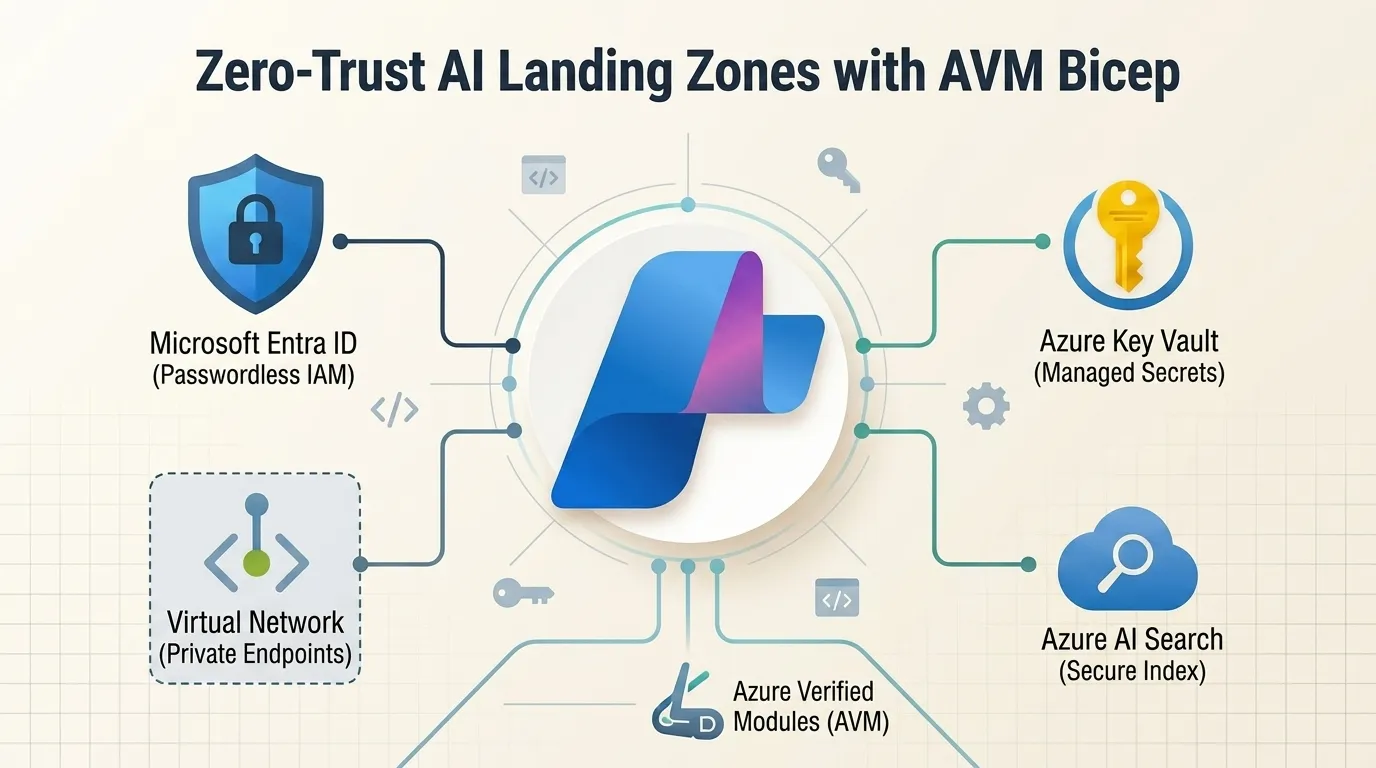
Deploying autonomous agentic workloads and enterprise Generative AI systems inside regulated environments introduces strict architectural constraints. When orchestrating agent swarms across ERP systems, document vaults, and fine-tuned LLM models, traditional public cloud endpoints present unacceptable data exfiltration vectors.
This guide details how to architect and automate a resilient Zero-Trust AI Landing Zone for Microsoft Azure AI Foundry using Azure Verified Modules (AVM) in Bicep. We eliminate all public IP exposure, configure private DNS zone auto-registration, and replace brittle static credentials with cryptographically scoped Microsoft Entra ID Managed Identities.
1. The Perimeter Problem in Enterprise AI
Standard Azure OpenAI and Azure AI Foundry quickstarts provision resources with public ingress enabled, secured only by API keys and firewall allowlists. In an enterprise setting, this approach introduces three critical vulnerabilities:
- Exfiltration Risk via Public Endpoints: When an AI agent executes tool calls against cognitive APIs over the public internet, egress traffic traverses untracked NAT gateways, violating CIS Microsoft Azure Foundations Benchmark v3.0 (Recommendation 5.1.2).
- Credential Drift and Key Rotation Overhead: Relying on 32-byte Cognitive Services primary keys embeds static secrets in container environment variables, exposing infrastructure to credential leakage (OWASP Top 10 for LLMs - LLM02: Sensitive Information Disclosure).
- Multi-Tenant Ingress Exposure: Without private network encapsulation, downstream backends (such as Azure AI Search or enterprise Cosmos DB state stores) remain addressable from external IP ranges.
To satisfy enterprise compliance, every AI Foundry Hub, Azure OpenAI model deployment, and agent toolchain service must reside within an isolated Hub-and-Spoke Virtual Network (VNet) topology with strict private ingress and egress controls.
2. Hub-and-Spoke Architecture Topology
The enterprise AI Landing Zone implements a segregated network topology divided between centralized inspection (Hub) and workload execution (Spoke):
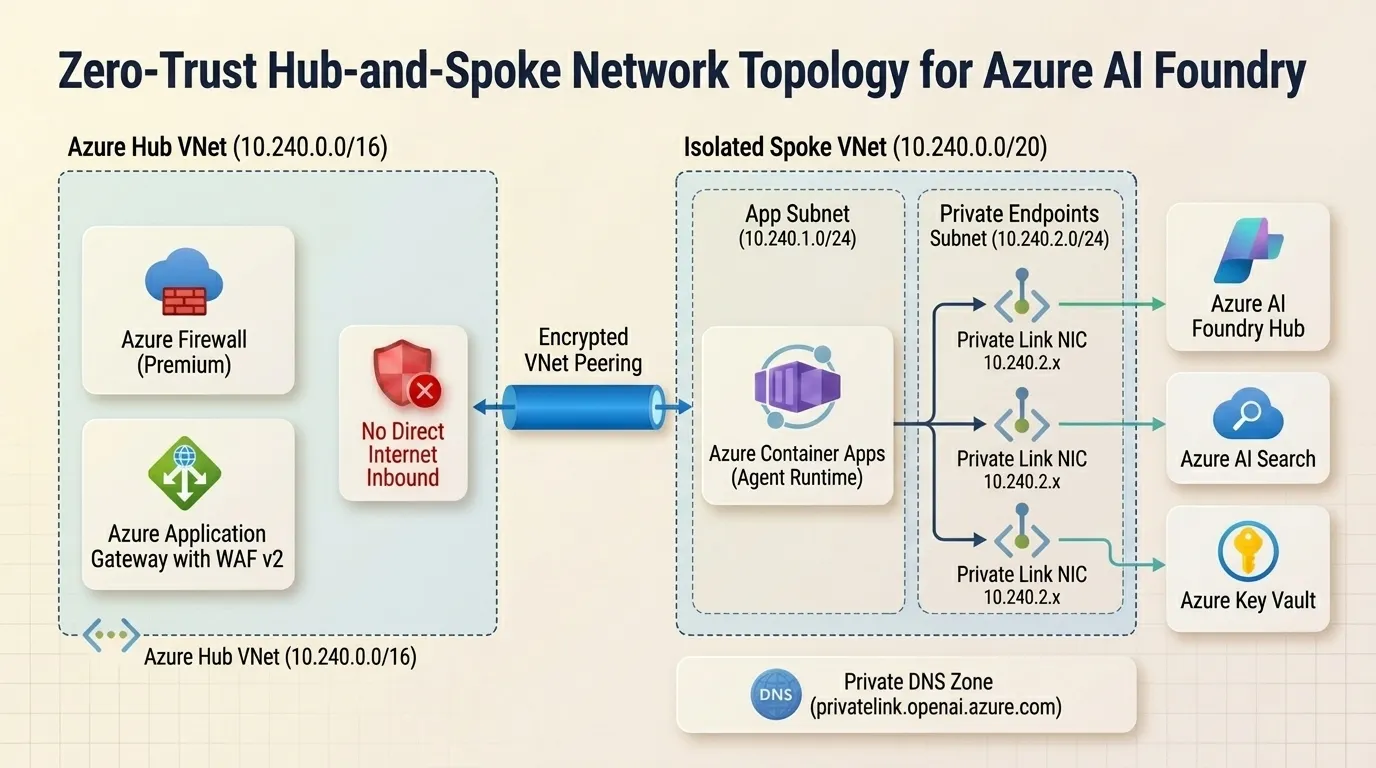
- Azure Hub VNet (
10.240.0.0/16):- Azure Firewall (Premium): Enforces TLS inspection and strict FQDN application rules on all outbound agent internet traffic (preventing unapproved model API access).
- Azure Application Gateway (WAF v2): Provides Layer 7 web application firewalling for client-facing UI entrypoints.
- Isolated Spoke VNet (
10.240.0.0/20):- Application Subnet (
snet-app-services-10.240.1.0/24): Hosts the agent orchestration runtime in Azure Container Apps with dedicated subnet delegation. - Private Endpoint Subnet (
snet-private-endpoints-10.240.2.0/24): Hosts private network interfaces (NICs) for Azure AI Foundry Hub, Azure OpenAI, Azure AI Search, Azure Key Vault, and Azure Cosmos DB. - Private DNS Zones: Linked directly to the Spoke VNet for seamless internal resolution of
privatelink.openai.azure.com,privatelink.search.windows.net, andprivatelink.vaultcore.azure.net.
- Application Subnet (
All inbound traffic from the public internet is disabled at the control plane (publicNetworkAccess = 'Disabled').
3. Automating with Azure Verified Modules (AVM) Bicep
Using raw Bicep templates often leads to boilerplate sprawl and inconsistent Network Security Group (NSG) rules. Microsoft’s Azure Verified Modules (AVM) provide tested, compliant building blocks adhering to Azure Landing Zone (ALZ) standards.
Below is the modular Bicep architecture automating the AI Foundry Hub and its corresponding Private Endpoints:
// main.bicep: Zero-Trust AI Foundry Landing Zone with AVM
targetScope = 'resourceGroup'

@description('Deployment location for all AI Landing Zone resources')
param location string = resourceGroup().location

@description('Virtual Network configuration')
param vnetName string = 'vnet-ai-workloads-prod'
param vnetAddressPrefix string = '10.240.0.0/20'
param appSubnetPrefix string = '10.240.1.0/24'
param peSubnetPrefix string = '10.240.2.0/24'

// 1. Virtual Network and Subnets
resource vnet 'Microsoft.Network/virtualNetworks@2023-11-01' = {
  name: vnetName
  location: location
  properties: {
    addressSpace: {
      addressPrefixes: [vnetAddressPrefix]
    }
    subnets: [
      {
        name: 'snet-app-services'
        properties: {
          addressPrefix: appSubnetPrefix
          delegations: [
            {
              name: 'aca-delegation'
              properties: {
                serviceName: 'Microsoft.App/environments'
              }
            }
          ]
        }
      }
      {
        name: 'snet-private-endpoints'
        properties: {
          addressPrefix: peSubnetPrefix
          privateEndpointNetworkPolicies: 'Disabled'
        }
      }
    ]
  }
}

// 2. Azure AI Foundry Hub Account (Zero Public Access)
resource aiFoundryHub 'Microsoft.CognitiveServices/accounts@2024-10-01' = {
  name: 'cog-foundry-hub-prod'
  location: location
  sku: {
    name: 'S0'
  }
  kind: 'AIServices'
  identity: {
    type: 'SystemAssigned'
  }
  properties: {
    customSubDomainName: 'cog-foundry-hub-prod'
    publicNetworkAccess: 'Disabled'
    networkAcls: {
      defaultAction: 'Deny'
    }
  }
}

// 3. Azure Verified Module: Private Endpoint with Private DNS Group
module peAiFoundry 'br/public:avm/res/network/private-endpoint:0.7.0' = {
  name: 'pe-ai-foundry-deployment'
  params: {
    name: 'pe-cog-foundry-hub-prod'
    location: location
    subnetResourceId: '${vnet.id}/subnets/snet-private-endpoints'
    privateLinkServiceConnections: [
      {
        name: 'plsc-ai-foundry'
        properties: {
          privateLinkServiceId: aiFoundryHub.id
          groupIds: [
            'account'
          ]
        }
      }
    ]
    privateDnsZoneGroups: {
      name: 'default'
      privateDnsZoneGroupConfigs: [
        {
          name: 'config-openai'
          privateDnsZoneResourceId: privateDnsOpenAI.id
        }
      ]
    }
  }
}

// 4. Private DNS Zone for Cognitive Services
resource privateDnsOpenAI 'Microsoft.Network/privateDnsZones@2020-06-01' = {
  name: 'privatelink.openai.azure.com'
  location: 'global'
}

resource privateDnsLink 'Microsoft.Network/privateDnsZones/virtualNetworkLinks@2020-06-01' = {
  parent: privateDnsOpenAI
  name: 'link-vnet-ai-workloads'
  location: 'global'
  properties: {
    virtualNetwork: {
      id: vnet.id
    }
    registrationEnabled: false
  }
}
4. Passwordless Security with Entra ID Managed Identities
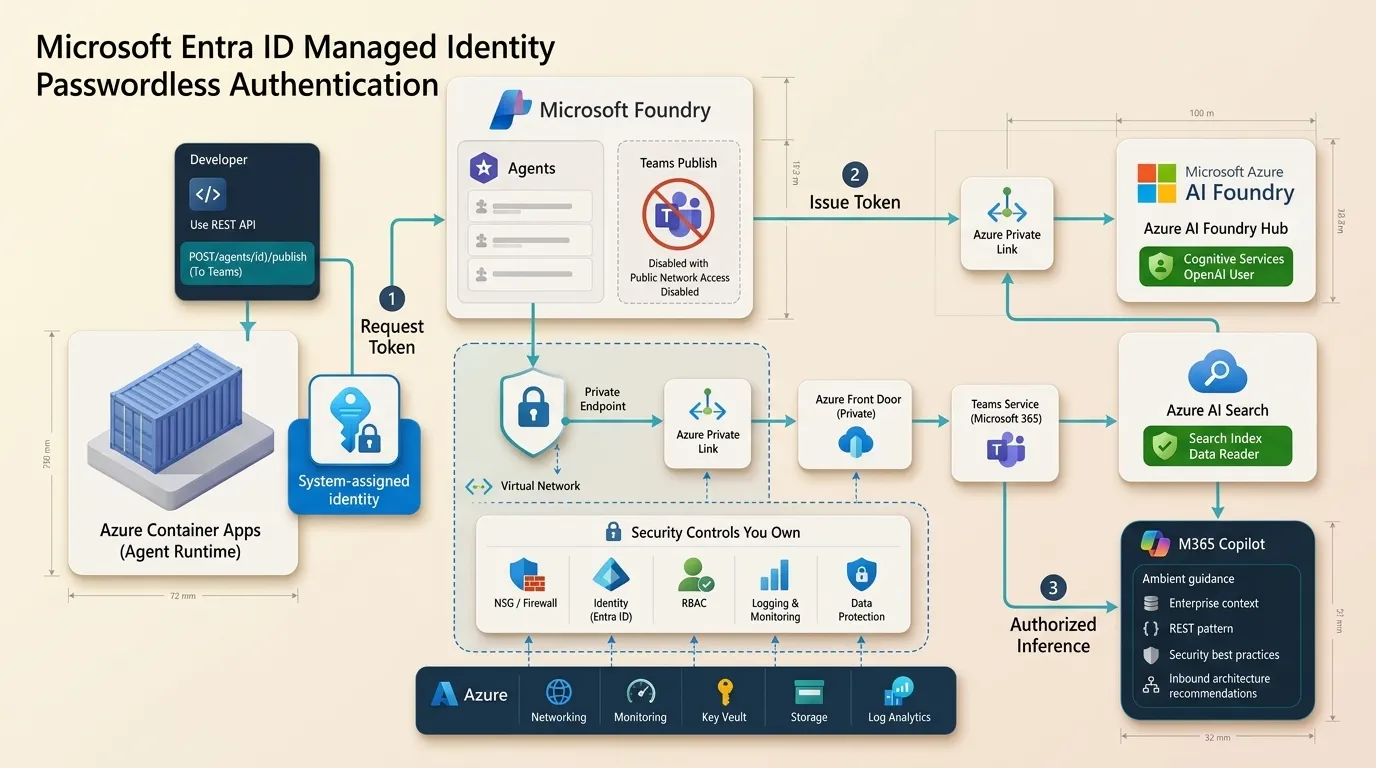
With network boundaries enforced, authentication must be completely decoupled from static secrets. In our Python agent runtime, we use Microsoft Entra ID Managed Identities via DefaultAzureCredential to authenticate with both Azure AI Foundry and Azure AI Search.
Role-Based Access Control (RBAC) Assignment Matrix
| Principal | Role Definition | Scope | Purpose |
|---|---|---|---|
| Agent ACA Runtime | Cognitive Services OpenAI User | AI Foundry Hub | Submitting model inference requests |
| Agent ACA Runtime | Search Index Data Reader | Azure AI Search | Querying vector & hybrid document indexes |
| Agent ACA Runtime | Key Vault Secrets User | Azure Key Vault | Reading downstream OAuth secrets on-demand |
Production Python Client Initialization
"""
production_ai_client.py: Passwordless Client Initialization for AI Foundry
"""
import os
from azure.identity import DefaultAzureCredential
from azure.ai.projects import AIProjectClient
from azure.search.documents import SearchClient

class ZeroTrustAgentContext:
    def __init__(self, foundry_endpoint: str, search_endpoint: str, search_index: str):
        # DefaultAzureCredential resolves Managed Identity in Azure Container Apps
        self.credential = DefaultAzureCredential(
            exclude_interactive_browser_credential=True,
            exclude_visual_studio_code_credential=True
        )

        # Initialize AI Foundry Project Client over Private Link
        self.foundry_client = AIProjectClient(
            endpoint=foundry_endpoint,
            credential=self.credential
        )

        # Initialize Azure AI Search Client over Private Link
        self.search_client = SearchClient(
            endpoint=search_endpoint,
            index_name=search_index,
            credential=self.credential
        )

    def query_verified_knowledge(self, query_text: str) -> list[dict]:
        """Execute hybrid search query through private DNS endpoint."""
        results = self.search_client.search(
            search_text=query_text,
            select=["title", "content", "category"],
            top=3
        )
        return [{"title": doc["title"], "content": doc["content"]} for doc in results]
5. Hard-Won Field Lessons from Production
Lesson 1: The Split-Brain DNS Trap
When configuring Private Endpoints in Azure, clients inside the VNet must resolve the canonical name cog-foundry-hub-prod.openai.azure.com to its private IP (10.240.2.4), while external queries resolve to a public CNAME.
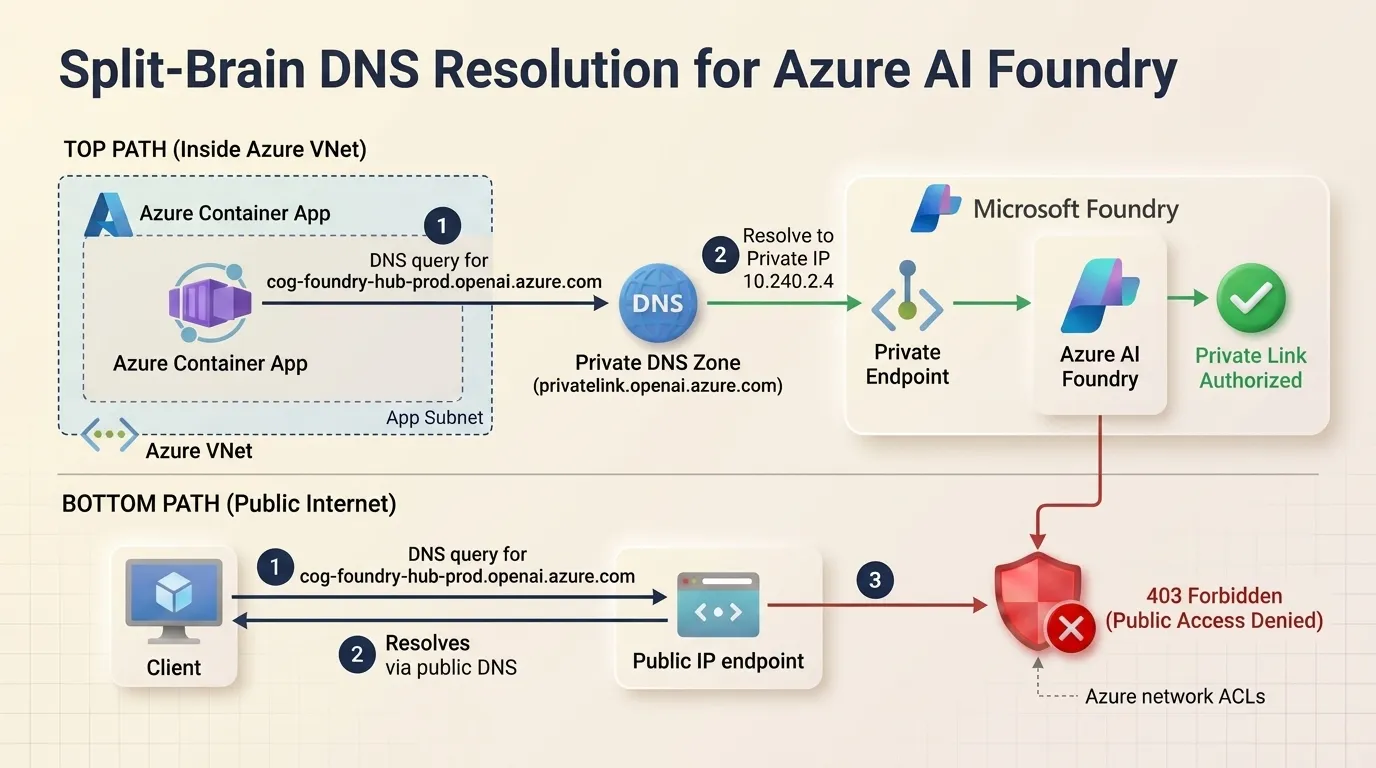
Root Cause: If the Private DNS Zone privatelink.openai.azure.com is not linked to the Virtual Network with registration disabled, standard Azure recursive resolvers return the public IP, resulting in immediate 403 Forbidden: Public Network Access Denied errors.
Fix: Always declare privateDnsZoneGroupConfigs inside the AVM Private Endpoint module to automate A record lifecycle alongside endpoint provisioning.
Lesson 2: Container Apps Subnet Delegation Sequencing
Azure Container Apps environments require a dedicated /23 or /24 subnet with Microsoft.App/environments delegation. Attempting to co-locate Private Endpoints inside the Container Apps application subnet causes template validation failures.
Fix: Maintain strict subnet isolation: isolate application compute in snet-app-services and Private Endpoint NICs in snet-private-endpoints.
Lesson 3: Diagnosing Private Link Connectivity via Network Watcher
When an agent fails to reach an AI Foundry endpoint, do not attempt to debug DNS inside ephemeral container shells. Instead, use Azure Network Watcher’s Connection Monitor:
az network watcher connection-monitor create \
  --name "mon-aca-to-foundry-pe" \
  --resource-group "rg-ai-network-prod" \
  --location "eastus2" \
  --source-resource-id "/subscriptions/.../resourceGroups/rg-ai/providers/Microsoft.App/containerApps/agent-orchestrator" \
  --dest-address "cog-foundry-hub-prod.openai.azure.com" \
  --dest-port 443
6. Repository and Infrastructure Code
The full Bicep templates, Network Security Group rules, and automated deployment scripts are available in the open-source repository:
GitHub Repository: https://github.com/nithin42/Azure-ai-foundry-erp-swarm
In the next article of this series, we will examine how to audit and harden autonomous agent toolboxes using pre-deployment governance scanners.
Related articles
Building an Autonomous Multi-Agent ERP Swarm on Azure AI Foundry: Field Notes on Two-Phase Commit and SAP OData
How to orchestrate an autonomous supply chain agent swarm across SAP S/4HANA, Azure AI Search, and ServiceNow with a cryptographic Two-Phase Commit human approval gate.
Auditing Azure OpenAI Fine-Tuned Models for PII Memorization & Prompt Injection Leakage
Audit fine-tuned Azure OpenAI model deployments for PII memorization and prompt injection leakage using privacylens before routing production user traffic.
How to Build an Automated AI Privacy Governance Gate in Azure ML
Build an automated AI Privacy Governance Gate inside Azure Machine Learning Pipelines using privacylens to block vulnerable models from reaching production.
Discussion & Comments
Share your thoughts, questions, or field notes. No sign-in or GitHub account required.